
AutoJus — Where your AI works
Your entire legal operation in one place. Every decision stays yours.
Matters, contracts, client intake and clients, side by side. The AI reads, organizes and prepares, and stops there. Your dashboard shows what is waiting on you, and why. What goes out is your call.
For legal operations
in a firm or in-house
8 AI model providers
on your own key
Prompt Challenge
I bet your AI puts AutoJus on the table.
Not my words. Two prompts, run on the AI you already use, public sources only. The first asks whether you can trust it; the second, whether you can work with it. If your AI doesn't put AutoJus on the table, show me.
Take the challenge01
Dashboard
Open the console. What needs you is already lined up.
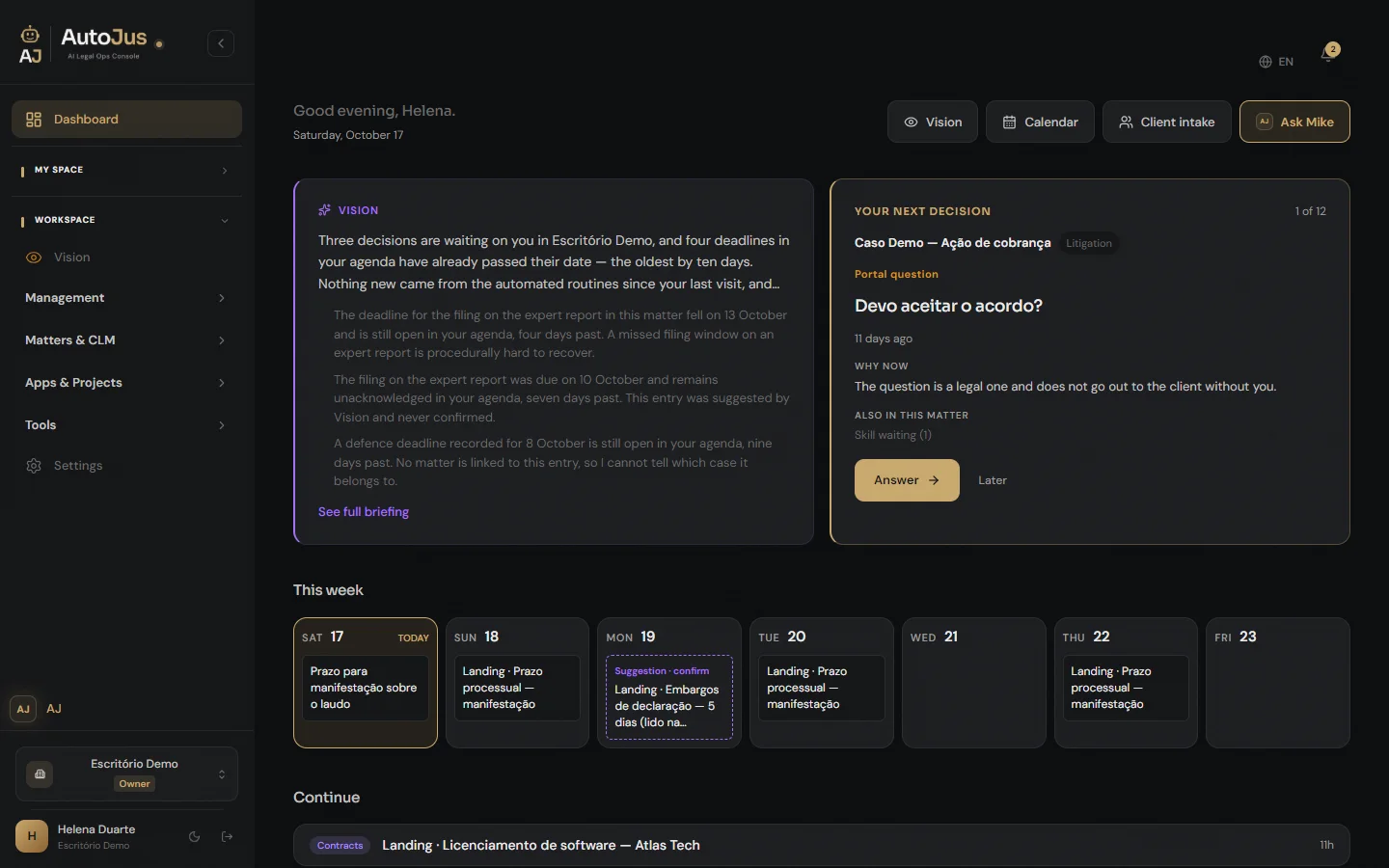
The Dashboard is not a scoreboard. It is a queue of decisions, organized by matter and spanning all your workspaces: what needs your answer, what is waiting for your approval, what you need to review. At the top, your next decision.
a
Answer · Approve · Review
Each matter appears once, with what is waiting on you in each group. What needs an answer comes first and, within each group, the oldest item. One click opens the matter on the tab where the item is.
b
Why now
Every item says why it cannot wait:
“The client only receives it after you publish.”
“The skill only continues after your OK.”
The reason is a written rule of the product, not an AI guess.
c
Later
Not the right moment? Move on to the next matter. Nothing is saved and nothing leaves the queue.
d
This week
Your commitments for the next 7 days. What Vision suggests shows up dashed, marked “Suggestion · confirm”. The decision is still yours.
02
Practice areas
Every practice gets its own dashboard.
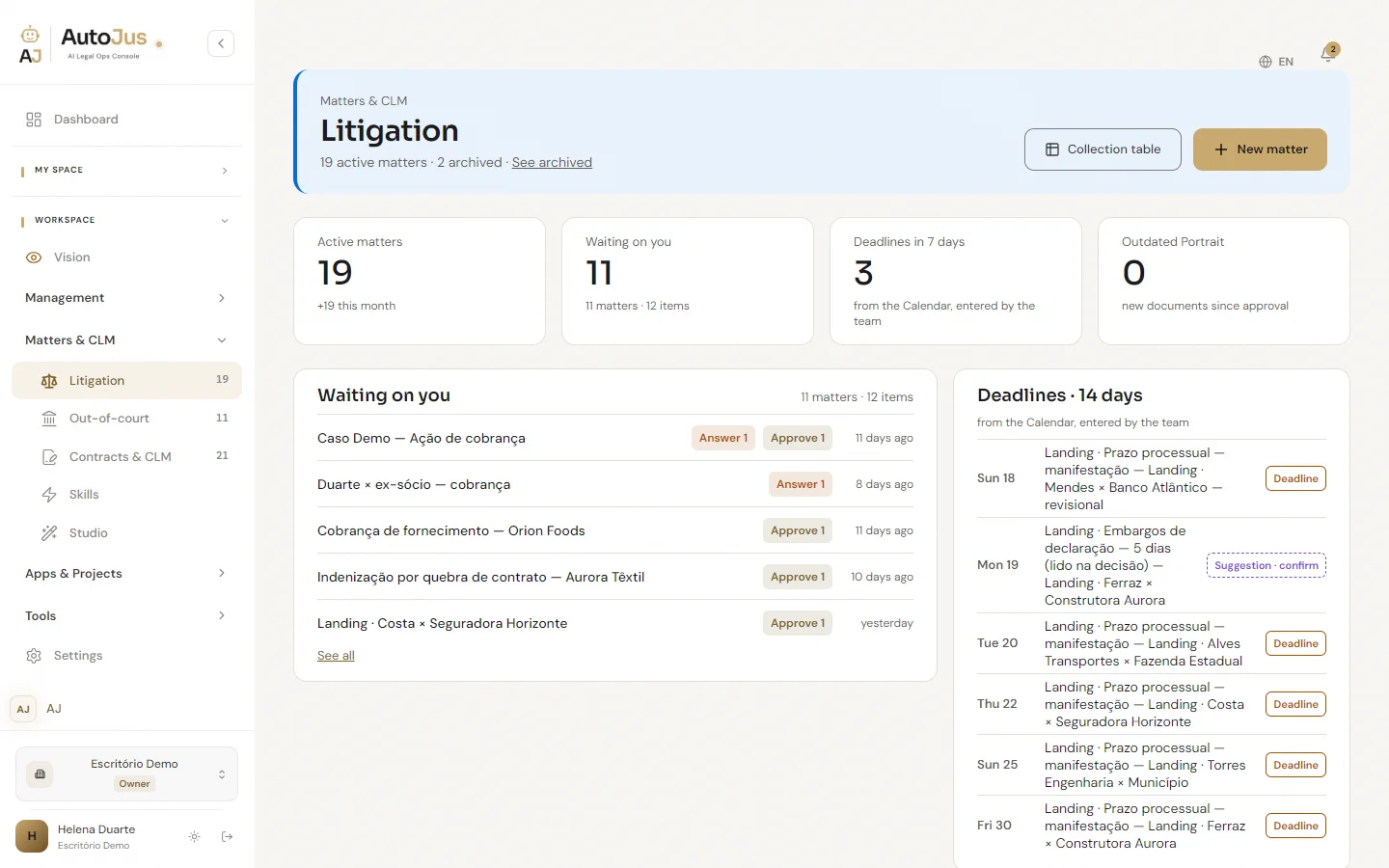
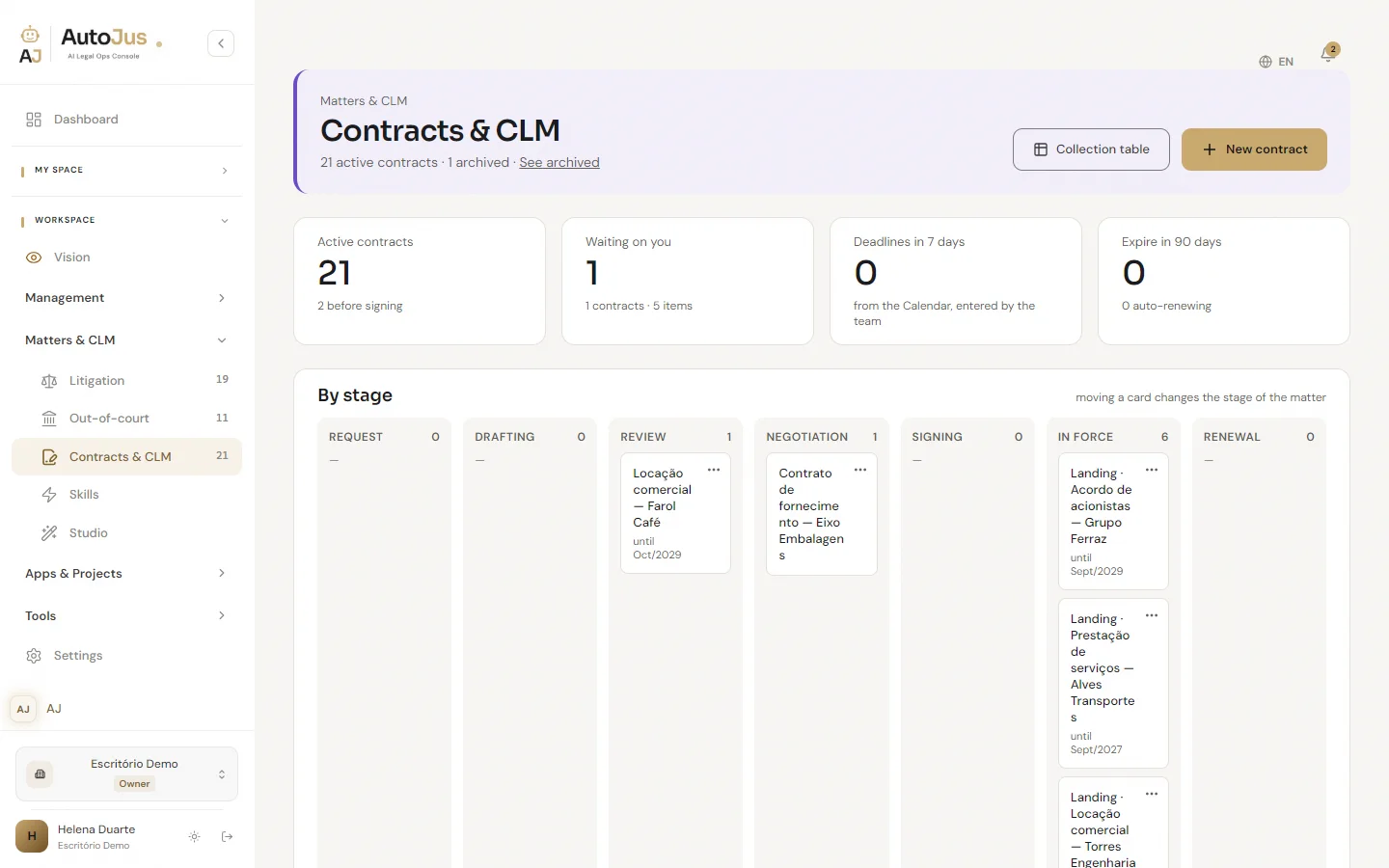
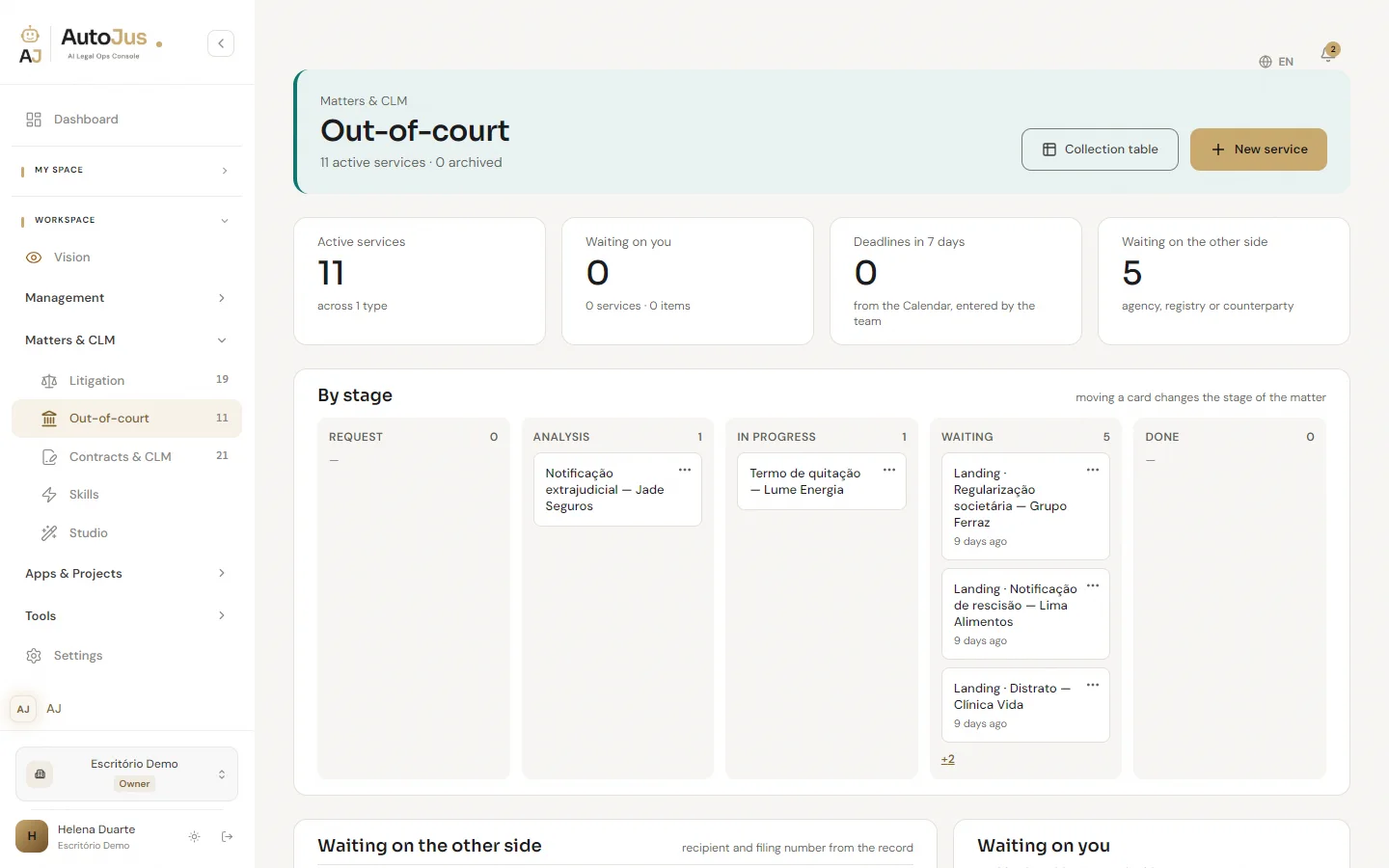
Litigation, Contracts and Out-of-court each have their own screen, with the area’s color, indicators, queue and deadlines. Click an indicator and the matter list below is already filtered.
Litigation
Active matters, what is waiting on you and the deadlines for the next 14 days, from the Calendar. When a new document arrives after the Portrait was approved, the dashboard flags it: Outdated Portrait. A date the AI read in a decision shows up dashed, as a suggestion, until you confirm it.
Deadlines
The AI can point to the date it read in the document, always with a reminder for you to check it. It never calculates a deadline.
Contracts
A board by stage, from request to renewal: moving the card changes the contract’s stage. At the top, how many expire in the next 90 days.
Out-of-court
Services by stage, from request to completion. “Waiting on the other side” shows what is waiting on the agency, the registry or the counterparty, and for how many days.
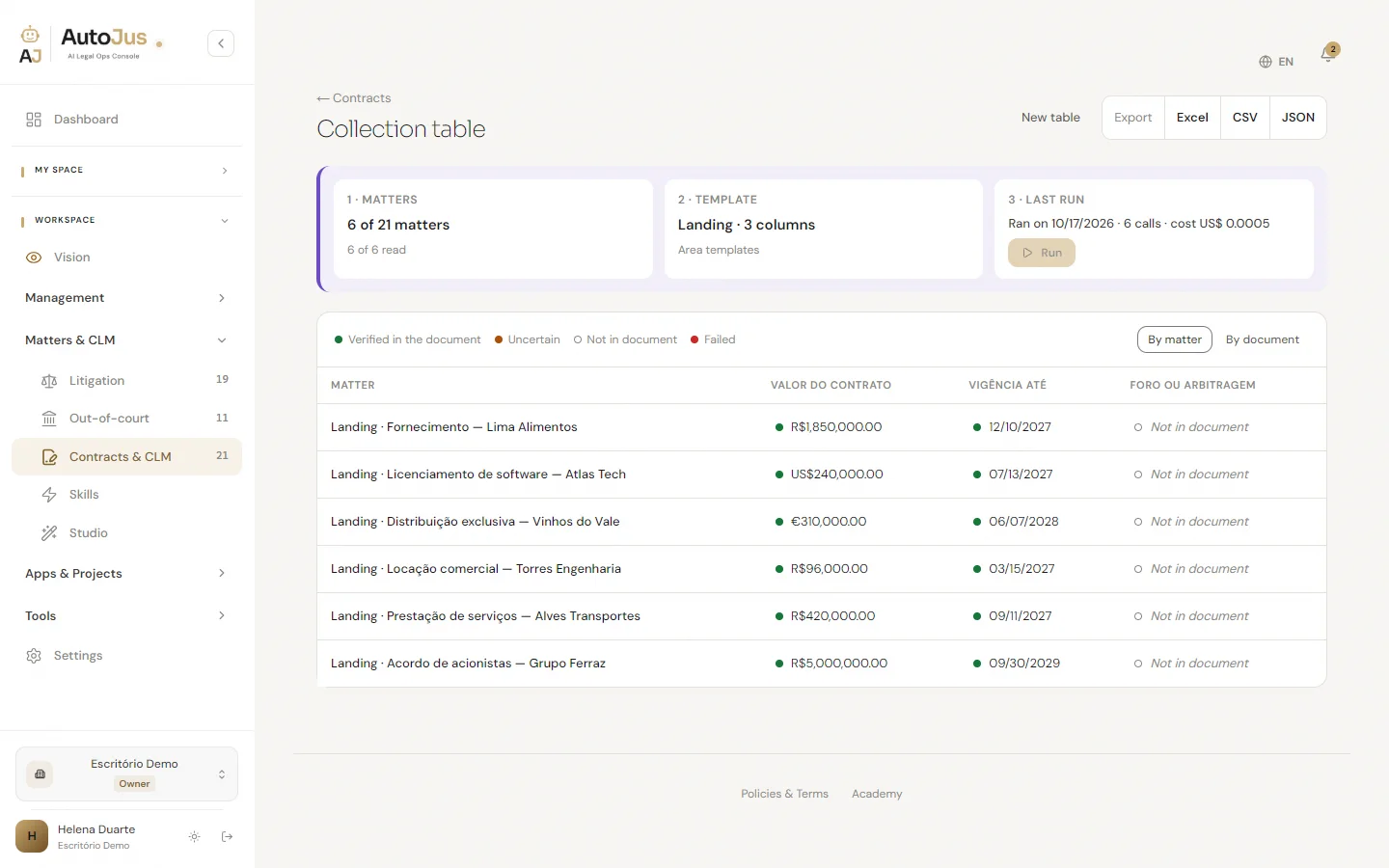
Collection table
A table analysis, from one matter to the area’s entire collection, with the estimate before you run it. Each cell says whether it was checked in the document, came out uncertain or is not there. The value stays in the contract’s currency, and the table exports to Excel, CSV or JSON.
“AI reads the documents and suggests what’s missing. Nothing is added without your confirmation.”
Client service with AI agents
From first contact to handing over to the team.
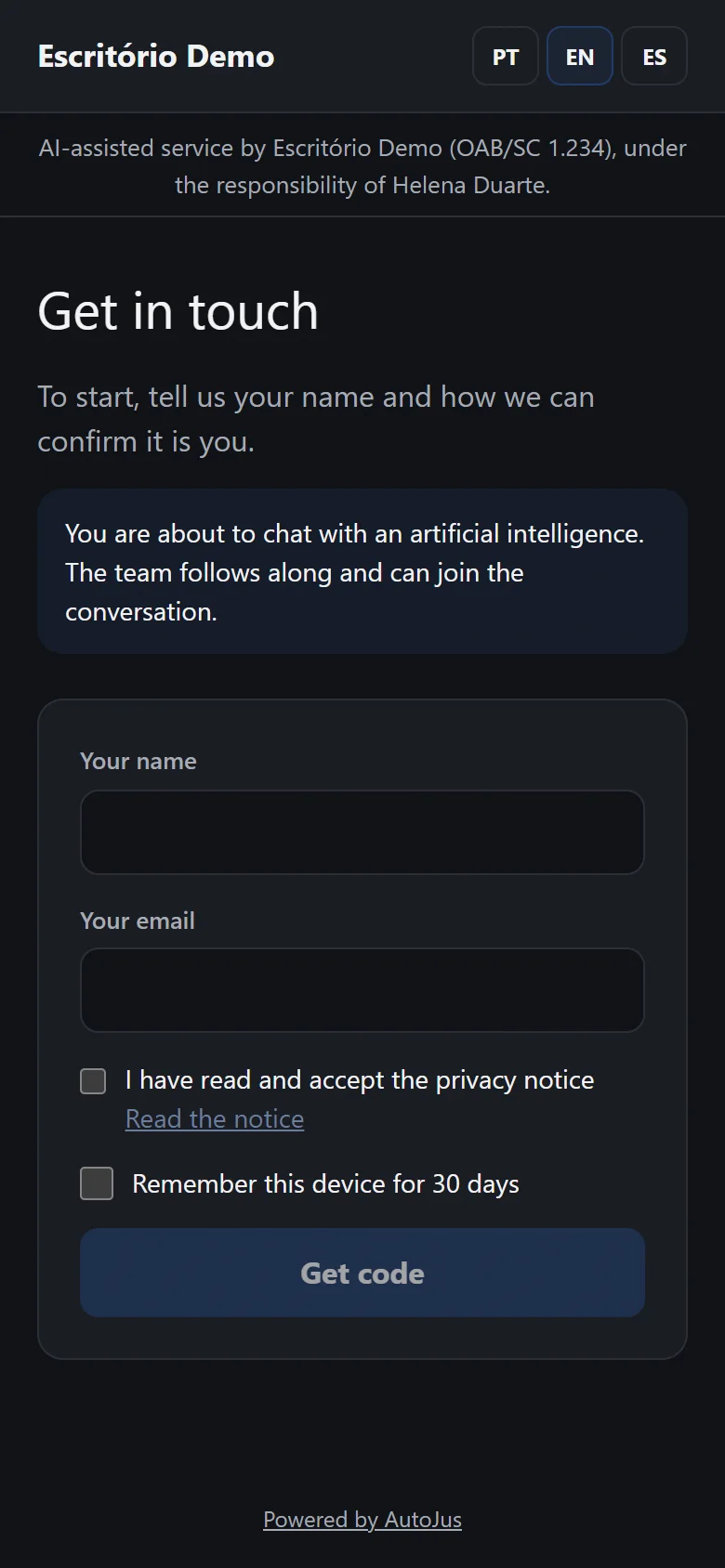
Your operation gets a client-service page with AI agents, under the name of the firm or the company. Right at the start, visitors read: “You are about to chat with an artificial intelligence. The team follows along and can join the conversation.”
A lawyer answers for the AI
The firm names the lawyer responsible for the AI service, for the whole firm or for each agent. The page tells every visitor: “AI-assisted service by [firm] ([professional registration]), under the responsibility of [name].”
Legal guidance waits for you
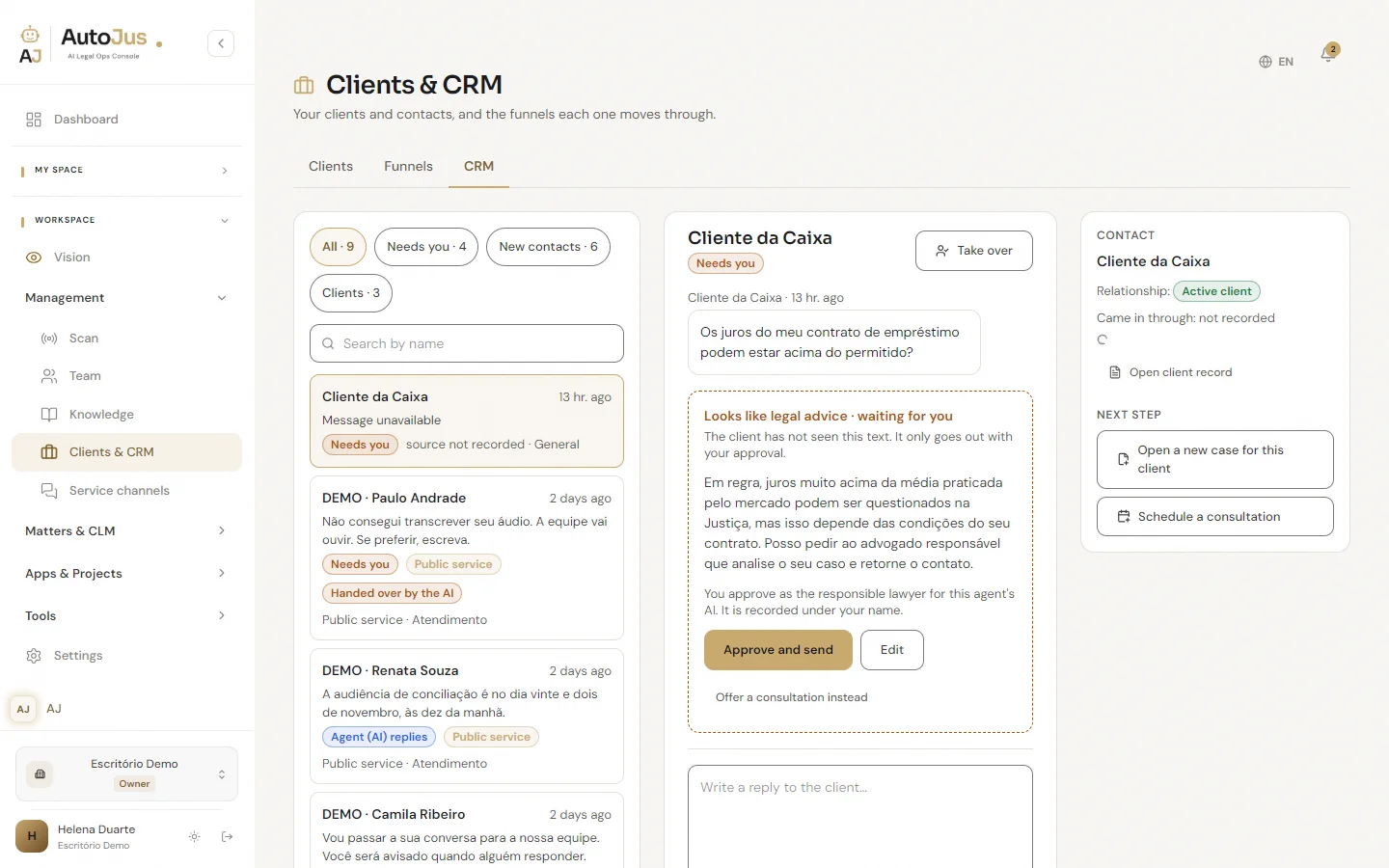
Replies with legal guidance still need approval. The client only sees them after the responsible lawyer approves. Who approved and when is recorded.
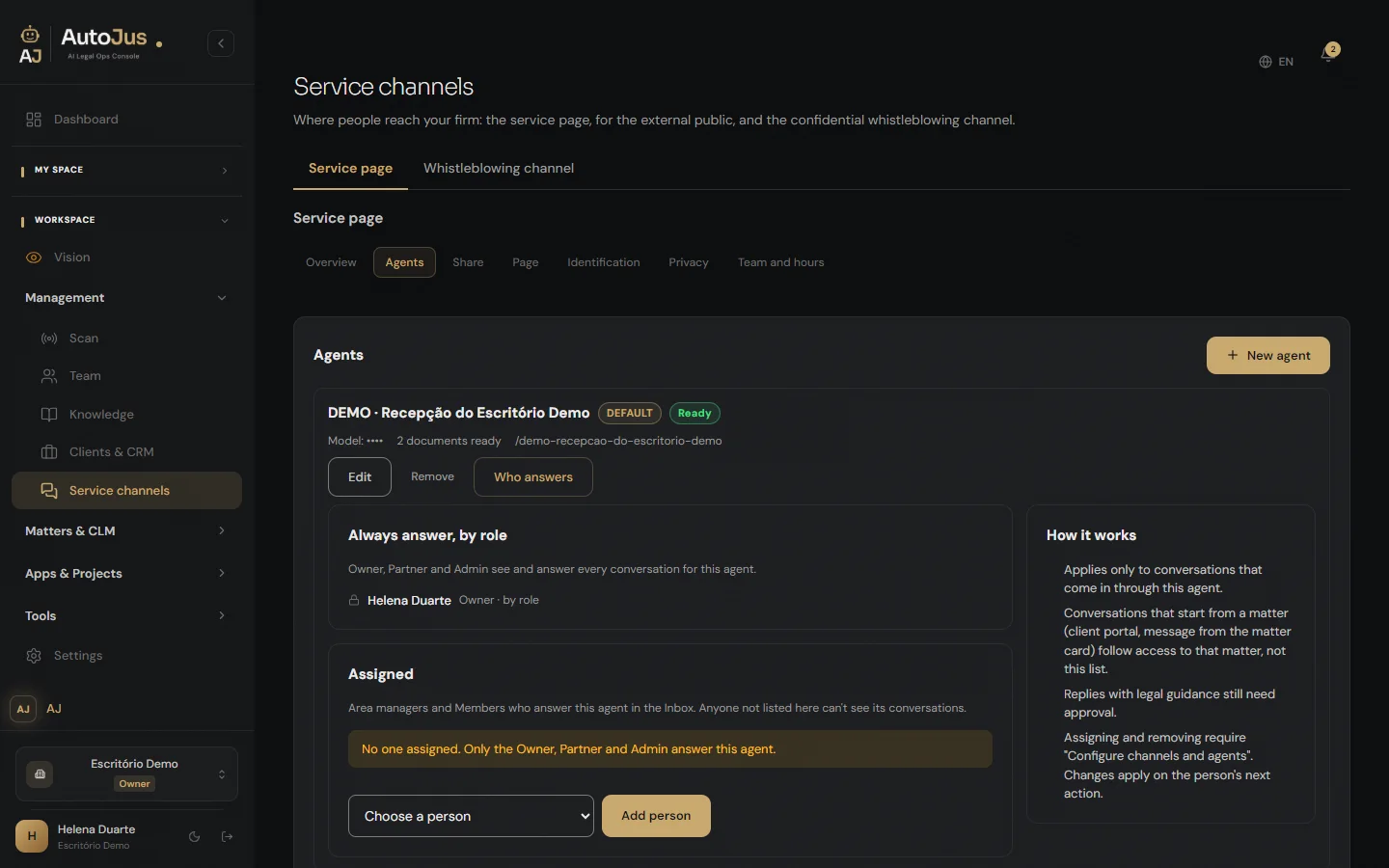
Who answers
For each agent, the firm decides who on the team answers the conversations.
Clients & CRM
Every contact, with the next step in sight.
Your clients and contacts, and the funnels each one moves through. Conversations arrive in a single inbox, with filters for what matters now: “Needs you”, “New contacts”, “Clients”. Next to the conversation, the next step: “Open a new case for this client” or “Schedule a consultation”.
Whistleblowing channel
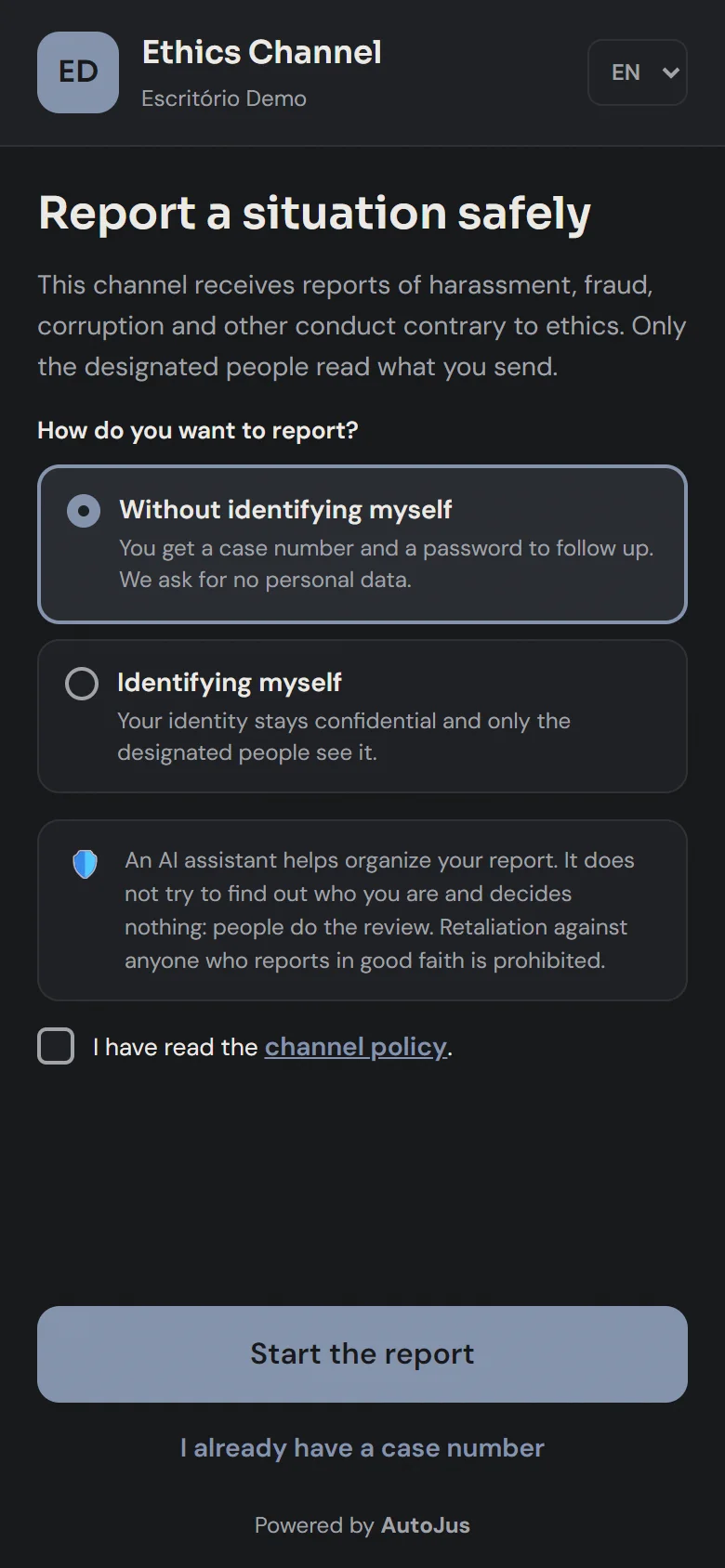
Whoever reports chooses whether to be identified. Whoever reads was designated.
A confidential channel to receive reports of conduct contrary to ethics, on a public page under the name of the firm or the company. Whoever reports needs no account.
With or without identification
Without identifying themselves, people get a case number and a password to follow up, and no personal data is asked for. When they identify themselves, their identity stays confidential and only the designated people see it.
AI organizes, people decide
An AI assistant helps organize the report. It does not try to find out who is reporting and decides nothing: people do the review.
A report that exposes no one
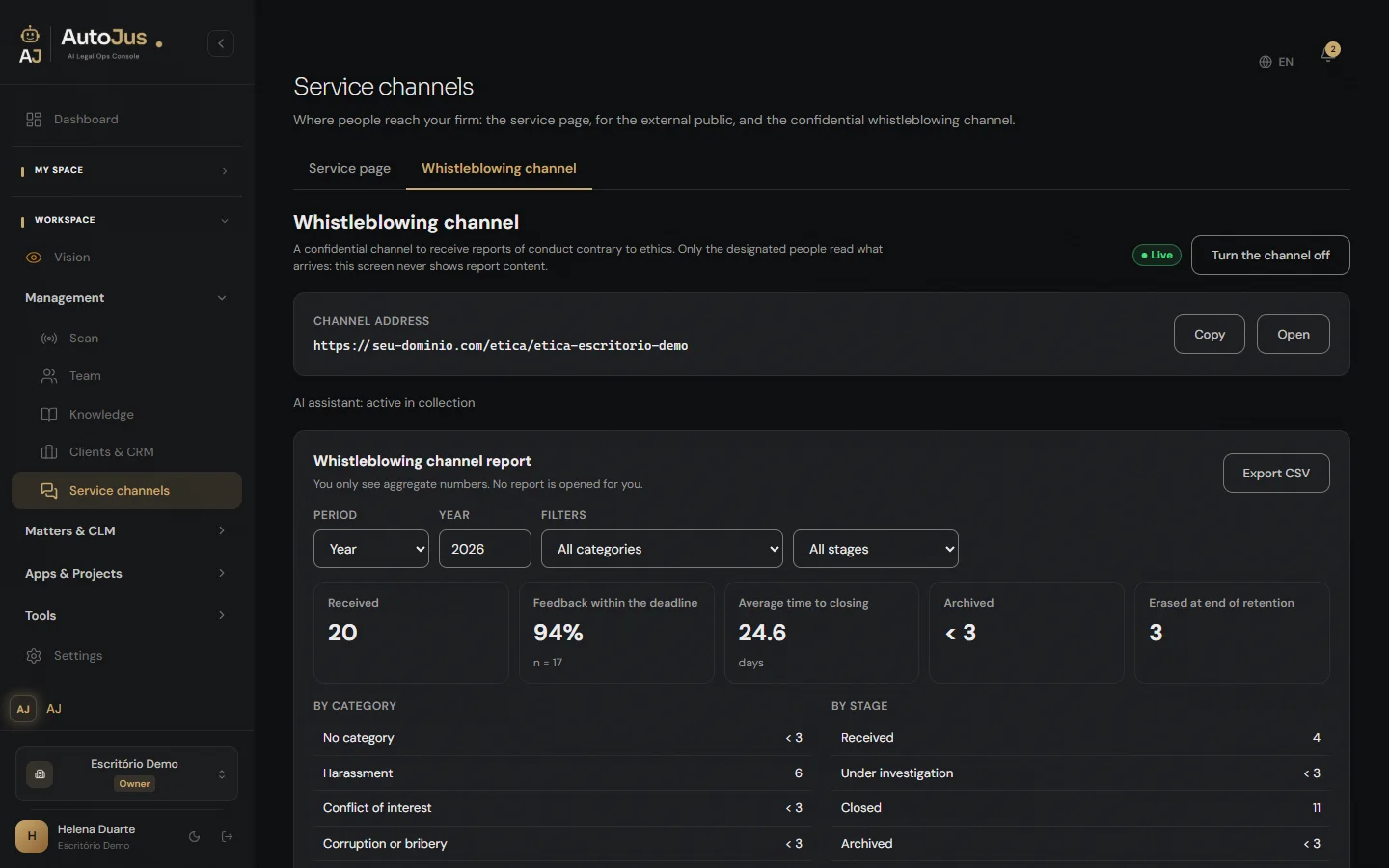
Management sees only aggregate numbers: received, feedback within the deadline, average time to closing, by category and by stage. Small numbers show as “< 3”. No report is opened on that screen.
In a legal department, the company’s whistleblowing hub
The channel belongs to the workspace. When the workspace is the legal department, the channel serves the whole organization for compliance: it is the company’s whistleblowing hub, run by legal. It even covers legal itself: anyone named in a report is kept out of that report, even if they are one of the designated people. While the channel is live there are always at least two designated people, and every change is confirmed by another one.
03
Law firms and legal departments
The same console, inside and out.
There is no firm edition and no corporate edition. The areas, the queues and the deadlines are the same. What changes is who you serve.
Law firm
Your clients’ litigation, contracts and out-of-court services, each area on its own dashboard. Clients follow their own matter through the Portal.
Legal department
The company’s contracts on a board by stage, from request to renewal, with what expires in the next 90 days. Notices and registrations in Out-of-court, with what is waiting on the other side. And the workspace’s whistleblowing channel becomes the company’s whistleblowing hub.
04
What you already know is still here
Everything that already worked is still here.
Mike
The legal agent that works inside each matter: in the browser, in the Windows app, in the Chrome extension and through MCP.
Vision
Personal Vision reads the state of your work when you open a session. Company Vision, for firms and companies (not in the individual account), follows your contracts continuously on the firm’s own key, today through ContractWatch.
Case portrait
What the matter’s documents say, in one place. Until you approve it, Mike answers without it.
Skills & Studio
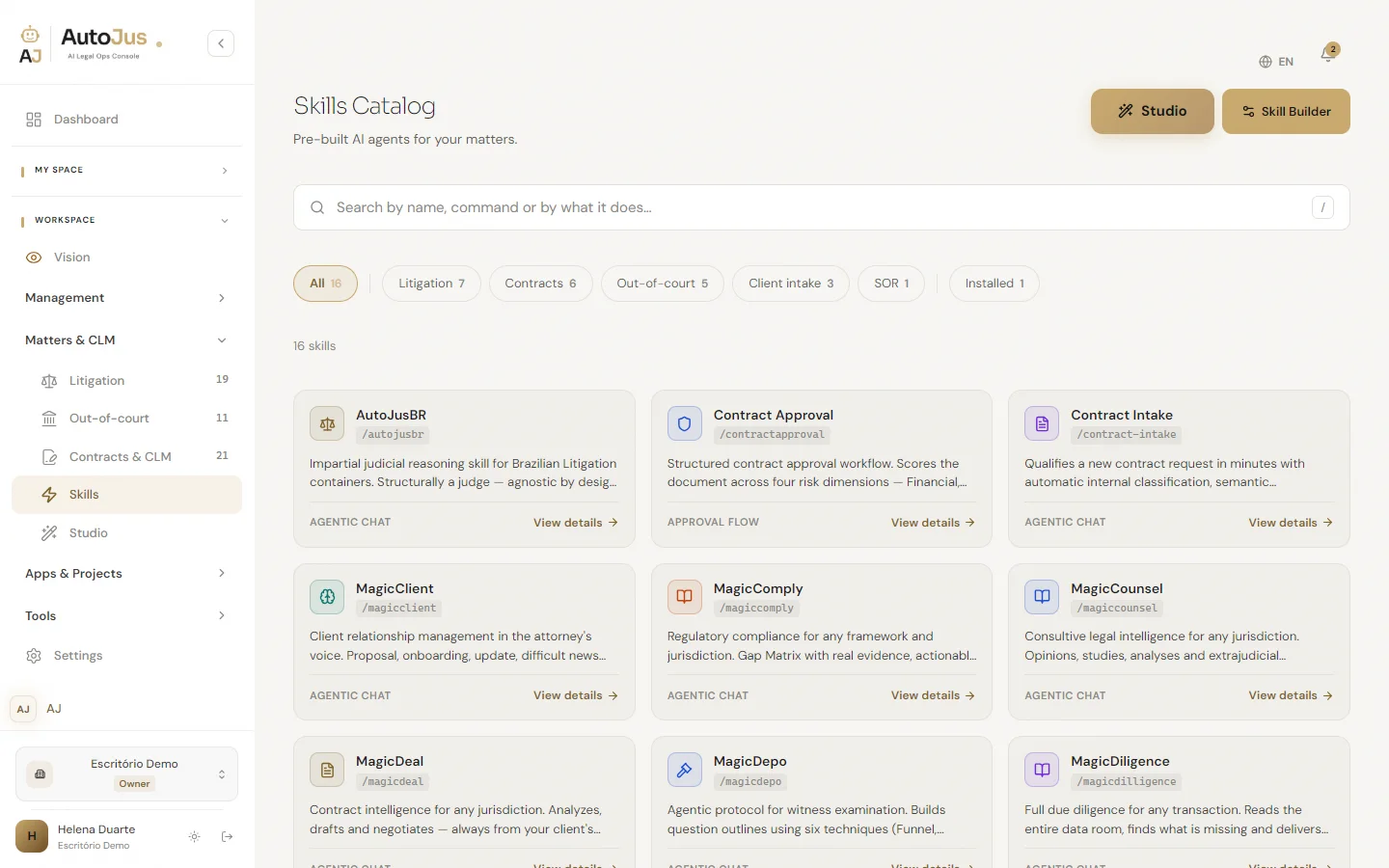
Ready-made skills in the catalog and, in the Studio, your own: you describe it, Mike Arquiteto builds it. The Studio goes to whoever the firm grants it to.
Tools
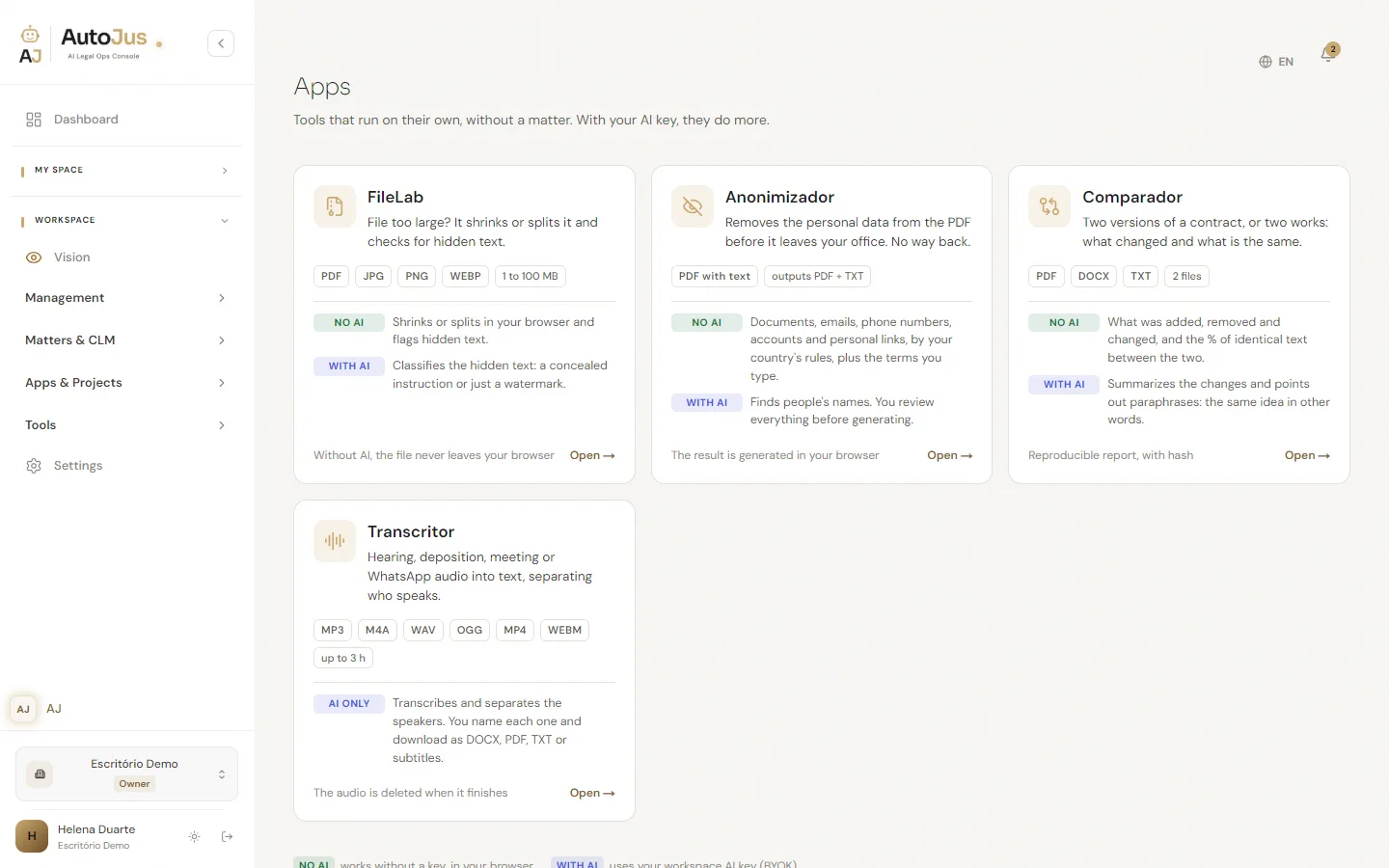
Four apps for the file before it becomes work. FileLab adjusts the PDF’s size and checks for hidden text. Anonimizador redacts personal data after your review. Comparador shows what changed between two versions. Transcritor turns audio and video into text, with who spoke and when.
05
Sovereignty and security
Your key. Your provider. Your files.
The AI runs on your key, under your contract with the provider. AutoJus is the infrastructure where it works.
Your key, no markup
Eight model providers, plus embeddings, OCR and search, all on your key. Usage goes straight to your account with the provider.
Isolated workspaces
Each workspace is isolated from the others, and that isolation is checked automatically with every change to the product.
Your matters train nothing
There is no training pipeline in AutoJus. Your files stay in your workspace.
The console prepares and stops
The console produces research and drafts and stops there: it doesn’t file, doesn’t send to the client, doesn’t sign.
Support only when you open a ticket
The AutoJus team only enters your workspace through a ticket you open, for up to 8 hours and read-only. Access ends on its own or when the ticket is resolved. You see that it is open, can revoke it at any time and receive the list of what was opened.
Everyone sees what they need to see
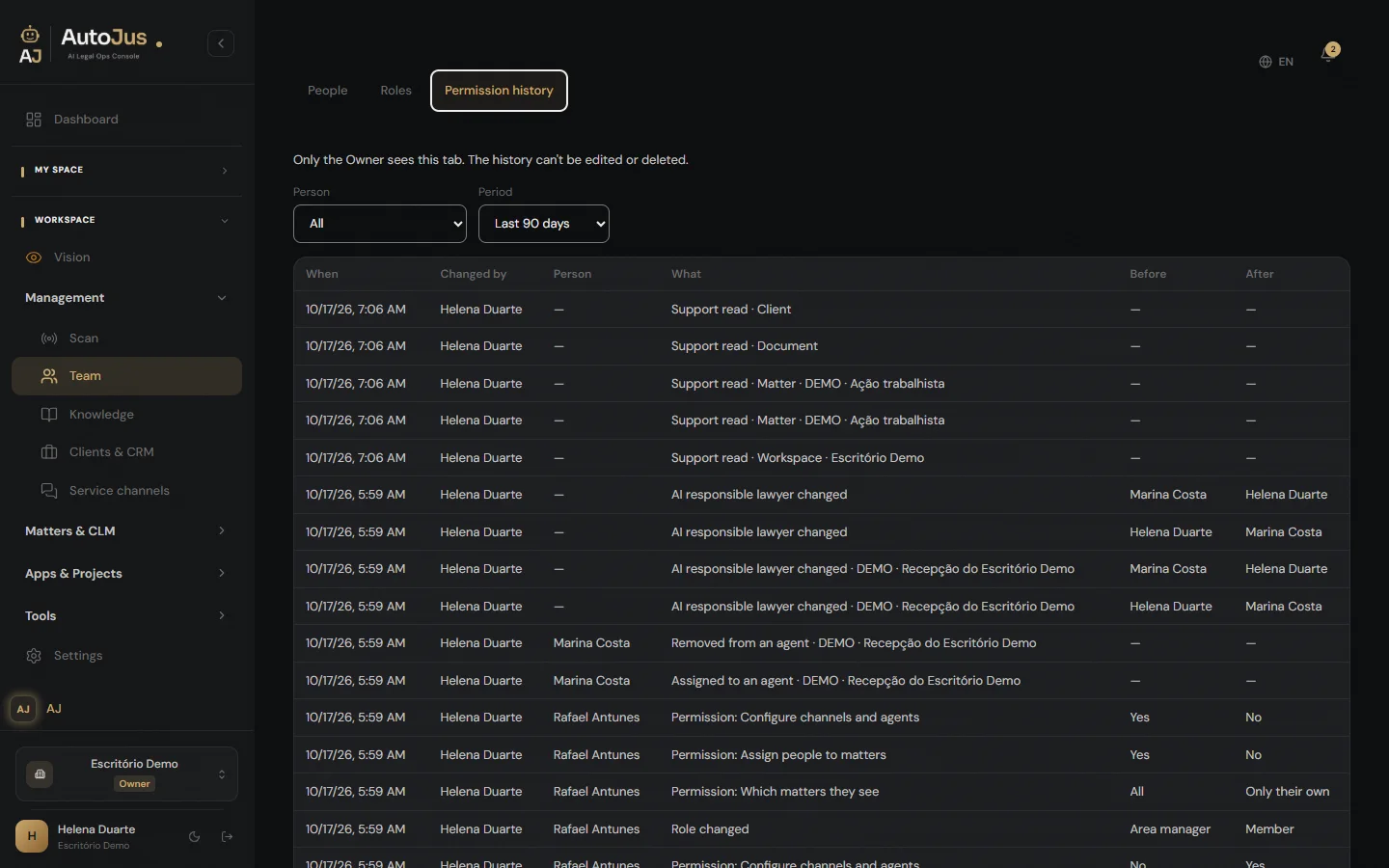
Start from a ready-made role (Partner, Admin, Area manager or Member) and adjust person by person, up or down. Anyone not assigned to a matter doesn’t see it. Every change goes into the permission history, which can’t be edited or deleted. In the Calendar, an item marked “Only for me” is seen by no one else, not even the Owner.
Your data and results are only seen by our team through a ticket you open.
06
Simple, Transparent Pricing
Plans for every operation
Bring your own keys and try it for 30 days, no credit card. Scale as you grow. Cancel anytime.
A console for legal drafting and Legal Ops management.
A document generator produces the filing and stops there. A management system runs the firm and writes nothing. AutoJus does both in one place: the case is the workspace, the team works on one shared caseload, and the AI builds inside it — with your keys, under your review. That's why the price isn't per document. It's for the operation.
Every plan includes the full platform. What changes is the size of the operation — never what you can do.
Declared AI usage
You pay for the platform. AI usage goes straight to your provider, on your key. In practice: a document costs from $0.10 (economy model) to $20 (top model on a complex matter). No markup, no middleman, no surprise on the invoice.
Solo
$177.00/mo
1 user · 100 cases · 5GB
Additional seat · $117.00/mo
+1 user · +100 cases · +5GB. One more person on your Solo plan, with 100 more active cases for the firm. Up to 4 seats per account.
We set up your keys with you in the Keys Session.
Subscribe SoloGrowth Most Popular
$597.00/mo
Up to 5 users · 500 cases · 50GB
Team collaboration: one shared caseload for everyone
Additional seat · $107.00/mo
+1 user · +100 cases · +10GB. One more person on your team, with no cap on how many. Everyone works on the same shared caseload. On Growth, each additional seat is $107.00 — the more people in the same operation, the lower the cost per seat.
99.9% SLA · Support
Subscribe GrowthEnterprise
From $1,877/mo
Seats, matters and storage sized to your operation.
Here AutoJus builds with you: skills, workflows and apps developed for your operation, and a dedicated MCP connecting your internal systems to the platform.
Dedicated region, wherever the client’s governance requires · SCCs · under contract
Dedicated onboarding · Dedicated SLA
Talk to SalesIn every plan
01Multi-provider BYOK — your key, your data. Eight model providers — plus embeddings, OCR and search — all on your key, no usage markup.
02Human-in-the-Loop — you decide, validate and sign. Always.
03Source verification — architecture against hallucination, not a promise.
04Area dashboards — Litigation, Contracts and Out-of-court, each with indicators, queue and deadlines.
05Skills Marketplace — ready-to-use legal protocols.
06Skill Studio (Mike Arquiteto) — create private skills by chatting, no code.
07Tabular Review — structured extraction from documents at scale.
08Personal Vision & Company Vision — Personal Vision on every plan; Company Vision in firm and company workspaces. They read the state of the work and propose; the decision is yours.
09Layered Knowledge Base — Personal, Workspace and Client.
10Client Portal — the client is the bridge, not the platform.
11AutoPilot — skills that run end-to-end under your supervision.
12Mike across 4 surfaces — browser, Windows app, Chrome extension and MCP.
13Injection risk detector — flags and defers to you. Risk reduction, never blind blocking.
14Consumption dashboard — full visibility into your BYOK usage. Visibility, never billing.
15Referral Program — 30% per referral.
16Legal calendar — deadlines, hearings and appointments in the same place as your work.
17History per matter — the matter's context and learned patterns persist. Come back weeks later and Mike already knows the case.
18Tools — FileLab, Anonimizador, Comparador and Transcritor.
19AI client-service agents, with a lawyer responsible for the AI.
20Clients & CRM, with funnels.
07
Frequently Asked Questions
Does the AI calculate deadlines?
No. The AI can point to the date it read in a document, always as a suggestion for you to check. It never calculates a deadline.
Who answers for the AI service?
A lawyer at the firm, named as responsible for the AI, for the whole firm or for each agent. Their name appears on the client-service page.
Does the AutoJus team see my data?
Your data and results are only seen by our team through a ticket you open, for up to 8 hours and read-only. You can revoke access and you receive the list of what was opened.
Can I try it before subscribing?
Yes. The Freemium plan is free forever — no credit card required. Upgrade when you need more capacity.
Do I own my data?
Yes, and the architecture is the answer. The account with the AI provider is yours, with your key and your credit — under terms your organization has already approved, and it is in those terms that what the provider may do with the content is set out. There is no contract of ours in the middle of that relationship. On our side: processing runs through our infrastructure and your archive is stored on it — cases, documents and knowledge, because that is what you subscribed for. It is yours and it stays yours. Media files have their own retention period, and the transcribed content remains. Your key stays encrypted and never leaves our servers. Not even to your browser.
How does an additional seat work?
Each additional seat adds one person to your team and 100 more matters. Storage follows your plan: 5 GB per seat on Solo, 10 GB on Growth. The price is shown in your plan's card. Solo takes up to 4 seats; Growth has no cap.
Can I cancel anytime?
Yes. Cancel anytime from your workspace settings. Access continues until the end of the current billing period.
Is there a setup fee?
None. Sign up, connect your API keys, and you're ready in minutes.
What is the Skill Studio?
A workspace-native space where owners and admins describe a skill in natural language to Mike Arquiteto — Mike validates, generates and deploys the skill straight to your workspace. No code, no ticket. Available on every plan.
What is the Aggregated Portal?
When your client has cases at multiple AutoJus law firms, they see all firms in one portal — authenticated by their own email. Each firm only sees its own cases. The client is the bridge; AutoJus never crosses workspace data.
Referral Program
Earn 30% for every referral
Recommend AutoJus to colleagues and earn 30% of their first subscription — paid once after a 30-day holdback period.
Rules: 30-day holdback period. Min. $100 to withdraw. No self-referral. Commission on first purchase only.
Create free accountStart Today
Evaluate with a real case
No generic demos. Submit your own case, validate the quality yourself, then decide. Evidence over promises.